 Wenn Ihr die Beta von Google Chrome 2.0 installiert gehabt habt, solltet Ihr ein weiteres Update erhalten haben. Google Chrome 2.0.172.30 wurde im Beta Channel veröffentlicht und bringt zwar keine neue Features, aber eine neue experimentelle Version der JavaScript Engine.
Die neue V8 Engine bringt experimentelle Änderungen mit. Die Entwickler erhoffen sich, dass Webseite mit viel JavaScript zum Beispiel Google Mail noch schneller geladen werden.
Wenn Ihr die Beta von Google Chrome 2.0 installiert gehabt habt, solltet Ihr ein weiteres Update erhalten haben. Google Chrome 2.0.172.30 wurde im Beta Channel veröffentlicht und bringt zwar keine neue Features, aber eine neue experimentelle Version der JavaScript Engine.
Die neue V8 Engine bringt experimentelle Änderungen mit. Die Entwickler erhoffen sich, dass Webseite mit viel JavaScript zum Beispiel Google Mail noch schneller geladen werden.
Schlagwort: chrome-update
Wenn Ihr die Beta von Google Chrome 2.0 installiert gehabt habt, solltet Ihr ein weiteres Update erhalten haben. Google Chrome 2.0.172.30 wurde im Beta Channel veröffentlicht und bringt zwar keine neue Features, aber eine neue experimentelle Version der JavaScript Engine.
Die neue V8 Engine bringt experimentelle Änderungen mit. Die Entwickler erhoffen sich, dass Webseite mit viel JavaScript zum Beispiel Google Mail noch schneller geladen werden.
Nach dem vor einigen Wochen eine Beta von Chrome 2.0 erscheinen ist und diese einige Male aktualisiert wurde, wurde nun die stabile Version freigegeben. Diese trägt die Versionsnummer 2.0.172.28.
Hier ein Überblick, über die wichtigsten Änderungen zwischen Google Chrome 1.0 und 2.0:
-"Neuer Tab"-Seite verbessert: Eines der am häufigsten gewünschte Features von Nutzern war es, dass man Webseiten von der "Neuer Tab"-Seite entfernen kann.
-Vollbild: Wenn man eine Präsentation gibt oder ein großes Video in Chrome schaut, kann die Taskbar, die Tableiste, die Adresszeile sowie die Lesezeichenleiste stören. Mit F11 oder alternative über den Schraubenschlüssel Vollbild kann man diese verstecken.
-Vervollständigen: Auto Fill hilft beim Ausfüllen von Formularen. Statt immer wieder seinen Namen einzutragen, werden diese beim Eingeben vorgeschlagen.
Außerdem wurden über 300 Bugs behoben, die zum Absturz führten, behoben und die Geschwindigkeit dank neuer Webkit und V8 Engine verbessert.
Das Update sollte sich in wenigen Tagen automatisch installieren.
Portable Version
Mit Google Chrome 2.0.181.1 haben die Entwickler das Dev-Update dieser Woche veröffentlicht. Die neue Version bringt keine neuen Features. Stattdessen werden Fehler ausgebessert und einige Komponenten aktualisiert.
So ist Webkit nun mit der Version 530.11, V8 1.2.4.1 und Gears 0.5.21.0 in Chrome integriert. Außerdem gibt es einige Kommandozeilen für Proxies.
Changes:
Fixed a common crash when using a French spell-check dictionary. (Issue: 8551)
Fixed a regression where maximizing Chrome turned the tab-background black. (Issue: 11695)
Improved remote desktop (RDP) performance by using the standard dotted rectangle when moving a tab out. (Issue: 805)
The command line debugger has been replaced by a graphical debugger using the WebKit inspector scripts tab to debug JavaScript running in V8.
It is now possible to set proxy setting from the command-line. See the issue for more information. (Issue: 266)
Mit Google Chrome 2.0.180.0 hat Google eine neue Dev-Version veröffentlicht. Diese Version bringt neben einem leicht veränderten Look viele Bugfixes und einige Features. Im PopUp Blocker gibt es nun den Punkt Always show pop-ups from... Mit dieser Option kann man eine Seite auf eine Whitelist setzen. PopUps werden dann automatisch angezeigt. Leider ist es derzeit noch nicht möglich eine Seite von der Whitelist zu löschen. Eine weitere sichtbare Änderung ist die leicht geänderte Theme. Der Hintergrund hat einen Farbverlauf und ist etwas dunkler als bisher: 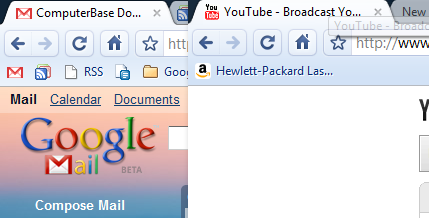 Bei Chromium findet man in den Optionen den Punkt Themes. Zur Zeit aber gibt es aber nur den Button Reset. Dieser setzt die Theme auf Standard zurück. In wenige Wochen wird es offiziell Themes geben. Diese Veröffentlichung bringt auch zahlreiche Vorbereitungen für die Erweiterungen, die Ende Mai erwartet werden. Release Notes Visible changes: [r14827] Support PgUp/PgDn in Omnibox for "first entry/last entry." (Issue: 6857) [r15115] Tell the user if Chrome is not the default browser. (Issue: 9049) [r15702] You can choose to allow pop-ups from a site. (Issue: 11440) Other changes of note: [r14891] Fix for crashing when zoomed into street level on maps.yahoo.com (Issue: 2044) [r14731] Patch from Mohamed Mansour for systems without an installed printer. (Issue: 6835) [r15020] Stop the location bar from flashing white when navigating from one HTTPS site to another. (Issue: 11157) [r15214] Fix for common issues around opening a new window. (Issues: 6377, 6192, 835) Lots of work around Extensions. (See r15417, r15271, r15310)
Google hat eine neue Beta von Google Chrome 2.0 veröffentlicht. Die Version 2.0.172.23 bringt viele Fehlerkorrekturen mit, aber auch einige neue Features.
Die wichtigsten Änderungen:
-Lots of UI tweaks, bug, and stability fixes!
-Added the ability to remove most visited thumbnails from the New Tab page. (Issue: 685)
-Autocomplete now pulls suggestions from search engines that support the functionality, and retains a history of those searches. For example, if you have searched from wikipedia.org in the past, start typing wikipedia.org in the omnibox, press the Tab key then a search term and suggestions and past searches will appear for Wikipedia. (Issue: 3636)
-Added a confirmation box when closing the browser with in progress downloads. (Issue: 1028)
-Added "Reopen closed tab" and create "New Tab" to the context menu on the tab bar. (Issue: 2144)
Die vollständigen Release Notes findet Ihr hier.
Ich denke, dass in wenigen Wochen 2.0 als Stabiles Update veröffentlicht wird.
» Portable
Google hat die stabile Version 1.0.154.64 von Google Chrome veröffentlicht. Mit dieser Veröffentlichung schließt Google zwei Sicherheitslücken, die man intern entdeckt hat.
CVE-2009-1441: Input validation error in the browser process.
A failure to properly validate input from a renderer (tab) process could allow an attacker to crash the browser and possibly run arbitrary code with the privileges of the logged on user. To exploit this vulnerability, an attacker would need to be able to run arbitrary code inside the renderer process.
More info: http://code.google.com/p/chromium/issues/detail?id=10869
Severity: Critical. An attacker might be able to run code with the privileges of the logged on user.
Mitigation: An attacker would need to be able to run arbitrary code in the renderer process.
CVE-2009-1442: Integer overflow in Skia 2D graphics.
A failure to check the result of integer multiplication when computing image sizes could allow a specially-crafted image or canvas to cause a tab to crash and it might be possible for an attacker to execute arbitrary code inside the (sandboxed) renderer process.
More info: http://code.google.com/p/chromium/issues/detail?id=10736
Severity: High. An attacker might be able to run arbitrary code within the Google Chrome sandbox.
Mitigations:
A victim would need to visit a page under an attacker's control.
Any code that an attacker might be able to run inside the renderer process would be inside the sandbox. Click here for more details about sandboxing.
Außerdem wurde bei dem Update Gears 0.5.16.0 integriert. Sollte Google Chrome nicht der Standardbrowser sein, erscheint oben diese Leiste:
Bei Chromium findet man in den Optionen den Punkt Themes. Zur Zeit aber gibt es aber nur den Button Reset. Dieser setzt die Theme auf Standard zurück. In wenige Wochen wird es offiziell Themes geben. Diese Veröffentlichung bringt auch zahlreiche Vorbereitungen für die Erweiterungen, die Ende Mai erwartet werden. Release Notes Visible changes: [r14827] Support PgUp/PgDn in Omnibox for "first entry/last entry." (Issue: 6857) [r15115] Tell the user if Chrome is not the default browser. (Issue: 9049) [r15702] You can choose to allow pop-ups from a site. (Issue: 11440) Other changes of note: [r14891] Fix for crashing when zoomed into street level on maps.yahoo.com (Issue: 2044) [r14731] Patch from Mohamed Mansour for systems without an installed printer. (Issue: 6835) [r15020] Stop the location bar from flashing white when navigating from one HTTPS site to another. (Issue: 11157) [r15214] Fix for common issues around opening a new window. (Issues: 6377, 6192, 835) Lots of work around Extensions. (See r15417, r15271, r15310)
Google hat eine neue Beta von Google Chrome 2.0 veröffentlicht. Die Version 2.0.172.23 bringt viele Fehlerkorrekturen mit, aber auch einige neue Features.
Die wichtigsten Änderungen:
-Lots of UI tweaks, bug, and stability fixes!
-Added the ability to remove most visited thumbnails from the New Tab page. (Issue: 685)
-Autocomplete now pulls suggestions from search engines that support the functionality, and retains a history of those searches. For example, if you have searched from wikipedia.org in the past, start typing wikipedia.org in the omnibox, press the Tab key then a search term and suggestions and past searches will appear for Wikipedia. (Issue: 3636)
-Added a confirmation box when closing the browser with in progress downloads. (Issue: 1028)
-Added "Reopen closed tab" and create "New Tab" to the context menu on the tab bar. (Issue: 2144)
Die vollständigen Release Notes findet Ihr hier.
Ich denke, dass in wenigen Wochen 2.0 als Stabiles Update veröffentlicht wird.
» Portable
Google hat die stabile Version 1.0.154.64 von Google Chrome veröffentlicht. Mit dieser Veröffentlichung schließt Google zwei Sicherheitslücken, die man intern entdeckt hat.
CVE-2009-1441: Input validation error in the browser process.
A failure to properly validate input from a renderer (tab) process could allow an attacker to crash the browser and possibly run arbitrary code with the privileges of the logged on user. To exploit this vulnerability, an attacker would need to be able to run arbitrary code inside the renderer process.
More info: http://code.google.com/p/chromium/issues/detail?id=10869
Severity: Critical. An attacker might be able to run code with the privileges of the logged on user.
Mitigation: An attacker would need to be able to run arbitrary code in the renderer process.
CVE-2009-1442: Integer overflow in Skia 2D graphics.
A failure to check the result of integer multiplication when computing image sizes could allow a specially-crafted image or canvas to cause a tab to crash and it might be possible for an attacker to execute arbitrary code inside the (sandboxed) renderer process.
More info: http://code.google.com/p/chromium/issues/detail?id=10736
Severity: High. An attacker might be able to run arbitrary code within the Google Chrome sandbox.
Mitigations:
A victim would need to visit a page under an attacker's control.
Any code that an attacker might be able to run inside the renderer process would be inside the sandbox. Click here for more details about sandboxing.
Außerdem wurde bei dem Update Gears 0.5.16.0 integriert. Sollte Google Chrome nicht der Standardbrowser sein, erscheint oben diese Leiste:
 Im Screenshot Chromium
Google Chrome 2.0.177.1 ist im Dev-Channel erschienen. Neben einer neue Webkit Version, einer Aktualisierung der JavaScript Engine V8 wurden wieder zahlreiche Bugs behoben.
Als einer der auffälligsten Fehler war, dass seit einigen Dev Updates auf einigen Seiten zum Beispiel im Google Calendar oder bei Wordpress Texte nicht angezeigt wurden. Dies ist nun endgültig behoben worden.
Release Notes:
[r14377] Allow Flash (and other plugins) to be installed without restarting the browser. This works by monitoring the MozillaPlugins registry key and reloading the plugin list afterwards. (Issue: 10574)
[r13934] On some sites text disappears or is never drawn. For example, on Google Calendar, the titles for all day events do not display. (Issue: 9904)
[r13662] Added "Restore closed tab" item to Tab menu.
[r13685] Fixes a bug where scrolling up would draw over the horizontal scrollbar on Mac.
[r13805] Fix issue: If SpellChecker is disabled through UI, then right-click context menu's spell checker language option should be unchecked. (Issue: 7239)
[r13807] Allow users to hit ctrl-shift-delete ("clear browsing data") even in fullscreen mode. (Issue: 9318)
[r13822] Fix a painting problem observed with windowless flash plugins, when they are initially created with a zero clip. (Issue: 10536)
[r13926] On uninstall ask whether to delete profile. (Issue: 8431)
[r13954] Disable the move/size/maximize entries on the system menu in fullscreen mode. (Issue: 8024)
[r14116] Add open/close animations to infobar, download shelf.
[r14167] Make sure radio buttons can't be toggled like checkboxes. (Issue: 10834)
[r14179] Disable RCtrl + RShift shortcut for changing directionality when no RTL language installed. (Issue: 9718)
[r14158] Fixes for selecting RTL text. (Issues: 6125, 8686)
[r13773] Fixes a problem where for some Indian locales, the automatic font fallback by Windows UI components leads to too tiny glyphs for UI strings. (Issue: 7319)
[r13644] Fix a crash where the ResourceMessageFilter is deleted before a SafeBrowsing check has completed. (Issue: 8544)
[r14137] Fix hang seen in plugin process. (Issue: 10711)
[r13679] Fix a crash when the browser opens a popup window in Linux.
[r13785] Fix crash in setup.exe. (Issue: 10507)
[r14115] Linux UI Crash (Issue: 10776)
Mit der Veröffentlichung von Google Chrome 1.0.154.59 wird eine schwere Sicherheitslücke geschlossen.
Wenn Google Chrome installiert war und der Nutzer über den Internet Explorer eine präparierte Seite geöffnet hat, wurde Google Chrome gestartet und mehrere Tabs geöffnet. Diese laden Schadcode und der Angreifer erlangt die Kontrolle über den PC.
Das Update soll wie immer automatisch erfolgen. Die Lücke wurde bereits sowohl in der Beta als auch in den Dev-Versionen geschlossen.
Google hat die Version 2.0.172.8 seines Browsers Chrome im Beta Channel freigeben. Die Version behebt zwei Fehler.
-On some sites text disappears or is never drawn. For example, on Google Calendar, the titles for all day events do not display.
-Google Chrome Beta does not launch after the update to 172.6. This affects users who installed Google Chrome through Google Pack, joined the Beta channel, and do not run as an administrator.
» Google Chrome Blog
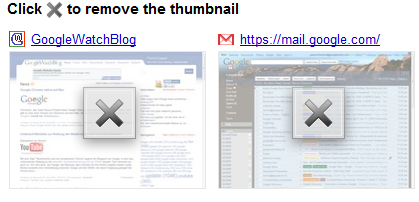
Google hat soeben Google Chrome 2.0.174.0 veröffentlicht. Neben den üblichen Fehlerkorrekturen gibt es ein neues Feature: Einzelne häufig besuchte Webseiten können von der "Neuer Tab"-Seite entfernt werden.
Im Screenshot Chromium
Google Chrome 2.0.177.1 ist im Dev-Channel erschienen. Neben einer neue Webkit Version, einer Aktualisierung der JavaScript Engine V8 wurden wieder zahlreiche Bugs behoben.
Als einer der auffälligsten Fehler war, dass seit einigen Dev Updates auf einigen Seiten zum Beispiel im Google Calendar oder bei Wordpress Texte nicht angezeigt wurden. Dies ist nun endgültig behoben worden.
Release Notes:
[r14377] Allow Flash (and other plugins) to be installed without restarting the browser. This works by monitoring the MozillaPlugins registry key and reloading the plugin list afterwards. (Issue: 10574)
[r13934] On some sites text disappears or is never drawn. For example, on Google Calendar, the titles for all day events do not display. (Issue: 9904)
[r13662] Added "Restore closed tab" item to Tab menu.
[r13685] Fixes a bug where scrolling up would draw over the horizontal scrollbar on Mac.
[r13805] Fix issue: If SpellChecker is disabled through UI, then right-click context menu's spell checker language option should be unchecked. (Issue: 7239)
[r13807] Allow users to hit ctrl-shift-delete ("clear browsing data") even in fullscreen mode. (Issue: 9318)
[r13822] Fix a painting problem observed with windowless flash plugins, when they are initially created with a zero clip. (Issue: 10536)
[r13926] On uninstall ask whether to delete profile. (Issue: 8431)
[r13954] Disable the move/size/maximize entries on the system menu in fullscreen mode. (Issue: 8024)
[r14116] Add open/close animations to infobar, download shelf.
[r14167] Make sure radio buttons can't be toggled like checkboxes. (Issue: 10834)
[r14179] Disable RCtrl + RShift shortcut for changing directionality when no RTL language installed. (Issue: 9718)
[r14158] Fixes for selecting RTL text. (Issues: 6125, 8686)
[r13773] Fixes a problem where for some Indian locales, the automatic font fallback by Windows UI components leads to too tiny glyphs for UI strings. (Issue: 7319)
[r13644] Fix a crash where the ResourceMessageFilter is deleted before a SafeBrowsing check has completed. (Issue: 8544)
[r14137] Fix hang seen in plugin process. (Issue: 10711)
[r13679] Fix a crash when the browser opens a popup window in Linux.
[r13785] Fix crash in setup.exe. (Issue: 10507)
[r14115] Linux UI Crash (Issue: 10776)
Mit der Veröffentlichung von Google Chrome 1.0.154.59 wird eine schwere Sicherheitslücke geschlossen.
Wenn Google Chrome installiert war und der Nutzer über den Internet Explorer eine präparierte Seite geöffnet hat, wurde Google Chrome gestartet und mehrere Tabs geöffnet. Diese laden Schadcode und der Angreifer erlangt die Kontrolle über den PC.
Das Update soll wie immer automatisch erfolgen. Die Lücke wurde bereits sowohl in der Beta als auch in den Dev-Versionen geschlossen.
Google hat die Version 2.0.172.8 seines Browsers Chrome im Beta Channel freigeben. Die Version behebt zwei Fehler.
-On some sites text disappears or is never drawn. For example, on Google Calendar, the titles for all day events do not display.
-Google Chrome Beta does not launch after the update to 172.6. This affects users who installed Google Chrome through Google Pack, joined the Beta channel, and do not run as an administrator.
» Google Chrome Blog
Google hat soeben Google Chrome 2.0.174.0 veröffentlicht. Neben den üblichen Fehlerkorrekturen gibt es ein neues Feature: Einzelne häufig besuchte Webseiten können von der "Neuer Tab"-Seite entfernt werden.
 Die Änderungen:
-Added "Undo Tab Close" and "New Tab" to the context menu on the tab bar. (Issue: 2144)
-It is no longer possible to cut or copy from a password text-field. (Issue: 9425)
-Ctrl+Shift+Arrow allows change in text direction in RTL UIs. Also now support Ctrl+Shift text alignment based on which side of the keyboard those keys are pressed.(Issues: 9762, 9763)
-Fixed issue where Google Calendar widget was not showing events.
-Added a "clear all downloads" link to downloads page.
» Vollständige Release Notes
Die Änderungen:
-Added "Undo Tab Close" and "New Tab" to the context menu on the tab bar. (Issue: 2144)
-It is no longer possible to cut or copy from a password text-field. (Issue: 9425)
-Ctrl+Shift+Arrow allows change in text direction in RTL UIs. Also now support Ctrl+Shift text alignment based on which side of the keyboard those keys are pressed.(Issues: 9762, 9763)
-Fixed issue where Google Calendar widget was not showing events.
-Added a "clear all downloads" link to downloads page.
» Vollständige Release Notes
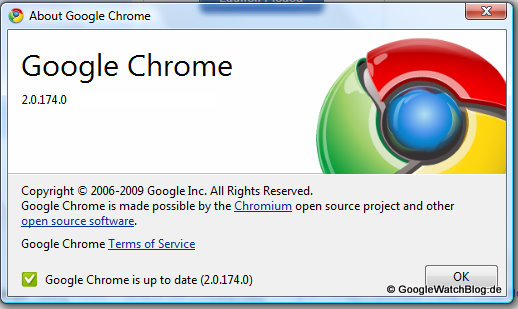 Alle, die die Google Chrome Beta 2.0.169.1 installiert haben, bekommen heute eine neue Version. Google Chrome 2.0.172.5 kommen zwar keine großen Features hinzu, doch die Version soll stabiler arbeiten.
Neu in dieser Version ist folgendes:
-Added support to cache some form submissions so that when you press back, you don't get the annoying "Confirm Form Submission"
-Autocomplete popup now appears when you press up/down key in a text-field.
-Visited links from normal browsing are no longer being displayed as visited (i.e. purple) in incognito mode.
-Pressing the Del key while a item is selected in the form suggestion popup deletes that suggestion.
» Google Chrome Blog
UPDATE 18:12 Uhr:
Google gab nun bekannt, dass die Version wegen eines Bugs, der Chrome zum Absturz bringt zurückgezogen wurde. Man wolle aber schon bald eine neue Version veröffentlichen.
Update 16.04.:
Mit Google Chrome 2.0.172.6 ist der Fehler behoben worden.
Nur der Vollständigkeit halber: Google Chrome 2.0.173.1 ist im Dev-Channel erschienen. Neue Features gibt es in dieser Version nicht. Lediglich Fehler werden ausgebessert.
Fixed a plugin crash related to FoxIt reader. (Issue: 9539)
V8 proxy resolver support is now enabled by default, and is no longer behind a flag. (Issues: 2764, 74)
Added a localizable font family and font size for rendered web content. This allows Chrome to display larger characters for certain international font families (e.g. Malayalam and Bengali). (Issue: 7319)
Fixed a crash which occured when canceling a save page operation. (Issue: 9738)
Cannot drag bookmarks on then New Tab page (Issue 9674).
Bekannte Fehler:
Mouse wheel scrolling does not scroll windows that aren't focused (9647).
Google Calendar widget not updating properly (Issue 8935)
Google hat die Chrome Version 2.0.172.2 veröffentlicht. Mit dieser Veröffentlichung im Dev-Channel werden Bugs behoben. Neue Feature gibt es nicht.
-Das Kopieren eines markierten Textes mit Rechtsklick Kopieren geht wieder
-Klickt man beim Ausfüllen eines Formulars, das über mehrere Seiten geht auf Zurück, gibt es nun weniger häufig den Hinweis "Confirm Form Submission", da die Daten in den Cache kommen
-Der Web Inspector sollte wieder funktionieren
-Beim Suchen von der Neuer Tab Seite aus stürzt Chrome nicht mehr ab
-Beim Drucken werden die meisten Seiten nun nicht mehr unten und rechts abgeschnitten
-Auf der Downloads Seite werden nun wieder die "Statuskreise" angezeigt. Außerdem gibt es wieder Infos wie lange ein Download noch dauert und wie schnell die Daten heruntergeladen wird
-Im Verlauf wird wieder mehr angezeigt als der Verlauf von heute
» Release Notes
Zum Einsatz kommt Webkit 530.5 und V8 1.1.6
Google hat heute Google Chrome 2.0.171.0 im Dev-Channel veröffentlicht. Diese Version bringt wieder neue Features mit. Zum einen ist das eine neue FTP Implementation zum anderen ein neues Bookmarkmenü.
FTP:
Für die neue FTP-Implementation lässt sich über die Kommandozeile --new-ftp aktivieren. Leider wird danach bei mir keine ftp:// Seite mehr geladen, daher kann ich keinen Screenshot liefern, ob sich auch an der Optik etwas geändert hat.
Neues Bookmarkmenü
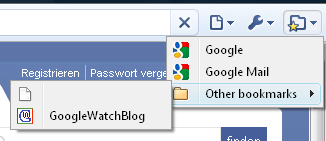
Wem die Bookmarkleiste in Chrome immer noch zu viel Platz wegnimmt, sollte beim Google Chrome 2.0.171.0 die Kommandozeile --bookmark-menu einfügen. Diese bring einen weiteres Menü neben die Adresszeile. Hier werden alle Lesezeichen angezeigt.
Alle, die die Google Chrome Beta 2.0.169.1 installiert haben, bekommen heute eine neue Version. Google Chrome 2.0.172.5 kommen zwar keine großen Features hinzu, doch die Version soll stabiler arbeiten.
Neu in dieser Version ist folgendes:
-Added support to cache some form submissions so that when you press back, you don't get the annoying "Confirm Form Submission"
-Autocomplete popup now appears when you press up/down key in a text-field.
-Visited links from normal browsing are no longer being displayed as visited (i.e. purple) in incognito mode.
-Pressing the Del key while a item is selected in the form suggestion popup deletes that suggestion.
» Google Chrome Blog
UPDATE 18:12 Uhr:
Google gab nun bekannt, dass die Version wegen eines Bugs, der Chrome zum Absturz bringt zurückgezogen wurde. Man wolle aber schon bald eine neue Version veröffentlichen.
Update 16.04.:
Mit Google Chrome 2.0.172.6 ist der Fehler behoben worden.
Nur der Vollständigkeit halber: Google Chrome 2.0.173.1 ist im Dev-Channel erschienen. Neue Features gibt es in dieser Version nicht. Lediglich Fehler werden ausgebessert.
Fixed a plugin crash related to FoxIt reader. (Issue: 9539)
V8 proxy resolver support is now enabled by default, and is no longer behind a flag. (Issues: 2764, 74)
Added a localizable font family and font size for rendered web content. This allows Chrome to display larger characters for certain international font families (e.g. Malayalam and Bengali). (Issue: 7319)
Fixed a crash which occured when canceling a save page operation. (Issue: 9738)
Cannot drag bookmarks on then New Tab page (Issue 9674).
Bekannte Fehler:
Mouse wheel scrolling does not scroll windows that aren't focused (9647).
Google Calendar widget not updating properly (Issue 8935)
Google hat die Chrome Version 2.0.172.2 veröffentlicht. Mit dieser Veröffentlichung im Dev-Channel werden Bugs behoben. Neue Feature gibt es nicht.
-Das Kopieren eines markierten Textes mit Rechtsklick Kopieren geht wieder
-Klickt man beim Ausfüllen eines Formulars, das über mehrere Seiten geht auf Zurück, gibt es nun weniger häufig den Hinweis "Confirm Form Submission", da die Daten in den Cache kommen
-Der Web Inspector sollte wieder funktionieren
-Beim Suchen von der Neuer Tab Seite aus stürzt Chrome nicht mehr ab
-Beim Drucken werden die meisten Seiten nun nicht mehr unten und rechts abgeschnitten
-Auf der Downloads Seite werden nun wieder die "Statuskreise" angezeigt. Außerdem gibt es wieder Infos wie lange ein Download noch dauert und wie schnell die Daten heruntergeladen wird
-Im Verlauf wird wieder mehr angezeigt als der Verlauf von heute
» Release Notes
Zum Einsatz kommt Webkit 530.5 und V8 1.1.6
Google hat heute Google Chrome 2.0.171.0 im Dev-Channel veröffentlicht. Diese Version bringt wieder neue Features mit. Zum einen ist das eine neue FTP Implementation zum anderen ein neues Bookmarkmenü.
FTP:
Für die neue FTP-Implementation lässt sich über die Kommandozeile --new-ftp aktivieren. Leider wird danach bei mir keine ftp:// Seite mehr geladen, daher kann ich keinen Screenshot liefern, ob sich auch an der Optik etwas geändert hat.
Neues Bookmarkmenü
Wem die Bookmarkleiste in Chrome immer noch zu viel Platz wegnimmt, sollte beim Google Chrome 2.0.171.0 die Kommandozeile --bookmark-menu einfügen. Diese bring einen weiteres Menü neben die Adresszeile. Hier werden alle Lesezeichen angezeigt.
 » Release Notes
Mit Google Chrome 1.0.154.53 ist ein Chrome Update für alle Nutzer von Google Chrome 1.0 und früher veröffentlicht worden. Features, aus Google Chrome 2.0 bringt das Update allerdings nicht.
Release Notes
- Fix a problem with logging statistics.
- Fix issue 5806: Blank entries can appear in the omnibox.
- Fix issues 7568, 6732, 6504: Issues with setting Google Chrome as the default browser on Vista.
- Prevent Javascript from accessing HTTP-only cookies.
- Add a histogram to track how Google Chrome was launched.
- Fix issue 4387: A tab crash when dates are set past Y3000.
- Fix issue 8473: Block reading unauthenticated bytes from the proxy when the user cancels a 407 proxy auth request.
- Fix issue 4150: Add SwissSign Gold CA as a trusted CA for extended validation (EV) certificates.
- Fix issue 7527: Add DigiNotar as a trusted CA for EV certificates.
» Release Notes
Mit Google Chrome 1.0.154.53 ist ein Chrome Update für alle Nutzer von Google Chrome 1.0 und früher veröffentlicht worden. Features, aus Google Chrome 2.0 bringt das Update allerdings nicht.
Release Notes
- Fix a problem with logging statistics.
- Fix issue 5806: Blank entries can appear in the omnibox.
- Fix issues 7568, 6732, 6504: Issues with setting Google Chrome as the default browser on Vista.
- Prevent Javascript from accessing HTTP-only cookies.
- Add a histogram to track how Google Chrome was launched.
- Fix issue 4387: A tab crash when dates are set past Y3000.
- Fix issue 8473: Block reading unauthenticated bytes from the proxy when the user cancels a 407 proxy auth request.
- Fix issue 4150: Add SwissSign Gold CA as a trusted CA for extended validation (EV) certificates.
- Fix issue 7527: Add DigiNotar as a trusted CA for EV certificates.